In Revit, line styles indicate different effects, such as a dashed or hidden line. Inevitably throughout a project, unwanted line styles will accumulate in the model. This accumulation is typically due to team members, not following standards. To ensure graphical consistency and easier management, BIM managers will generally want to consolidate line styles to the bare minimum.

Limitations
While it is easy to delete a line style, Revit will not warn you that the line style is in use. Nor will it offer you the option of substituting the line style for another. Deleting the line style will convert all model or detail lines using that style to the default <Lines> line style and make re-assigning an element’s line style very difficult.
Substitute line styles with Dynamo
To solve this problem, Parametric Monkey has developed a custom Dynamo graph as part of our Dynamo Package Development service that substitutes a model or detail line’s line style for another.
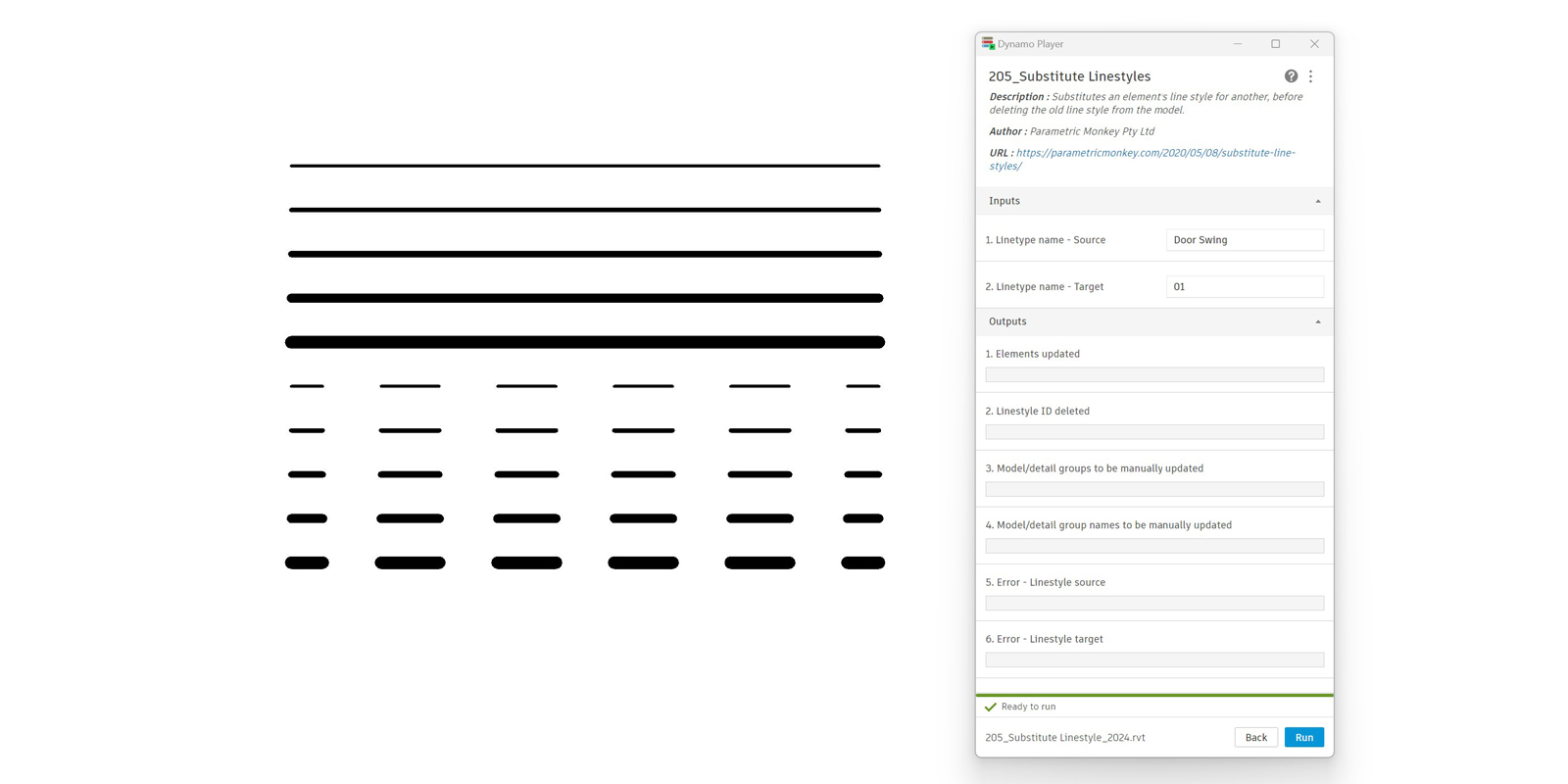
To run the graph:
- Define the source line type (#1). This is the line type to be deleted.
- Define the target line type (#2).
- Press Run.
Computational Logic
The graph first checks that the source and target line styles are present in the document. If not, the graph is aborted, and an error is returned. In this scenario, the user should check the spelling and re-run. Remember to ensure that you have no active commands in Revit before re-running, including closing the line styles window. Otherwise, the graph will not be able to run.
If both the source and target line styles are found, the graph collects all the model and detail lines that match the source line style and modifies them to the target line style. Due to Revit limitations, model or detail lines nested within a group will either need to be un-grouped or manually fixed. Therefore, elements that are nested within a model or detail group are excluded and returned separately for manual review. While it is technically possible to duplicate a group, modify the line styles in that group, and then replace all groups with the new group, this is too prone to errors and is best avoided.
Once all elements have been modified and the line style no longer has any instances, the line style is deleted.
Conclusion
To find out more about our Dynamo Package Development service, drop us a line and discover how we can automate your Revit workflows.