

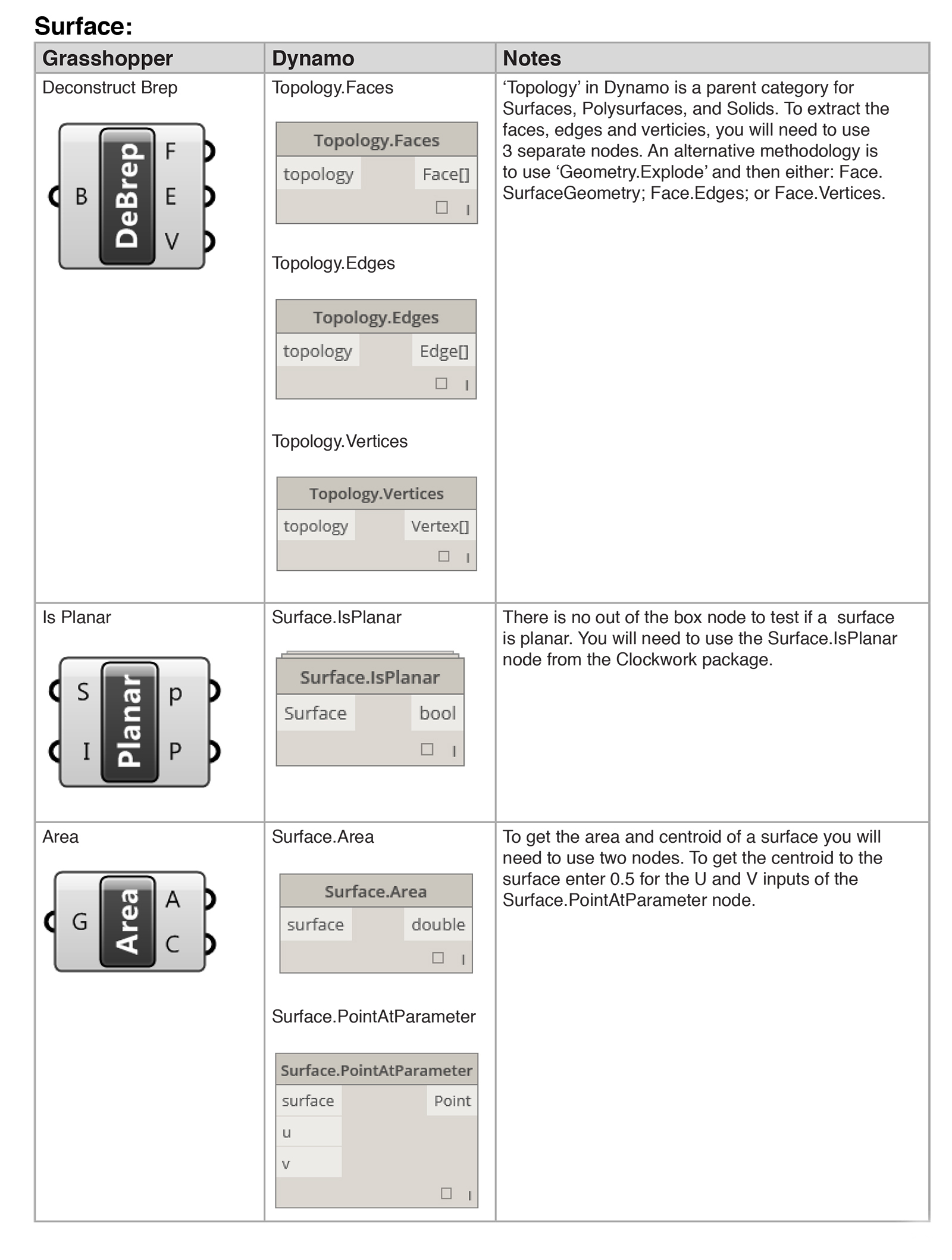
A while back, I took the plunge and tried to learn Dynamo. As a Grasshopper user, it was quite frustrating knowing the computational workflow required but not the equivalent commands in Dynamo. After a lot of research, I developed this primer which contains tips and translations to help Grasshopper users learn Dynamo. I hope that you find it useful in migrating your Grasshopper skills into Dynamo.






6 Comments
William Lopez Campo (@UnderNDA)
Thanks for putting this together Paul!
Here’s an (older) resource that explores a similar approach:
Keep up the good work!
paulwintour
Mr Campo! Thanks. I hadn’t seen this before. Andrew does some great work and this video is pretty clear. A few minor updates have changed since it was published but nothing critical.
tiara
Nice work! Really helpful
Jean-Charles
Very Usefull, Thank you very much
Alexi
It’s interchangeable too! I’ve used it a bunch of times now as a “Grasshopper for Dynamo users” guide 🙂 Thanks!
paulwintour
Glad you liked it Alexi. Thanks for the feedback. I am currently in the process of writing v2 which should be released within a month or so. I’ll keep you posted.